Review the clauses that actually change the deal
LeaseLens focuses on additional terms, schedules, and custom clauses. It uses retrieval from Ontario tenancy sources to keep analysis grounded and make multi file review faster and more dependable.
Custom clause focus
Pull out schedules and added clauses instead of treating the whole lease like a generic blob of text.
Grounded explanations
Connect results to retrieved Ontario sources so the answer is not just free form model output.
Batch review flow
Keep many documents in one workspace and run review without repeating the same steps file by file.
Review queue
Additional terms across active lease files
Lease A
Additional terms detected
Lease B
Schedule A and Schedule B
Lease C
Appendix language found
Source
Residential Tenancies Act
Match
Deposit and termination language retrieved for review
Grounded results help reduce hallucination by tying the explanation to retrieved Ontario material before the final assessment is shown.
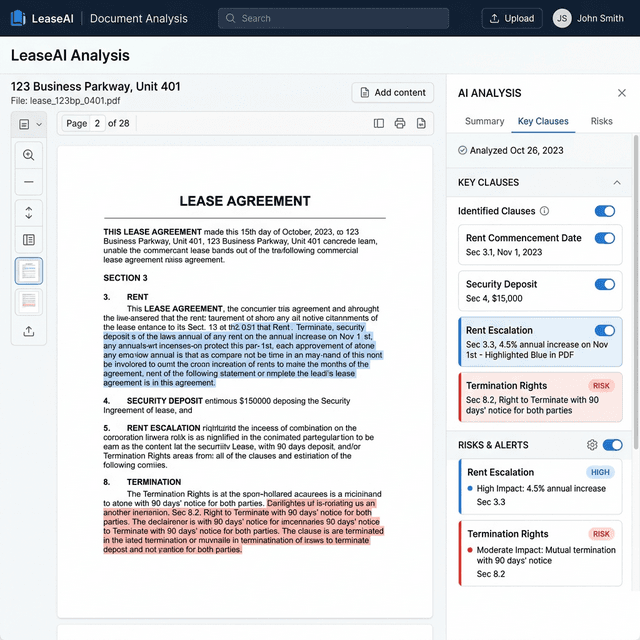
Clause level review
See additional terms in context, not as isolated snippets
LeaseLens highlights the exact language inside the uploaded file and pairs it with a structured review pane. That makes it easier to inspect custom clauses, compare the text with retrieved context, and understand why a term needs attention.
Text anchored review
Keep the clause text, source page, and review signal visible in one place while you read.
Additional terms first
Give priority to schedules, appendices, and added obligations where unusual risk often appears.
Grounded analysis
Use retrieval to keep the explanation tied to Ontario sources
The product is not meant to stop at a generic model answer. LeaseLens retrieves Ontario tenancy material first, then uses that context to support the final review. This lowers the chance of unsupported claims and keeps the output closer to the governing rules.
The tenant must provide post dated payments for the full lease term and must give ninety days notice before termination.
Ontario source
Residential tenancy rules on payment methods and notice language
Why it matters
The explanation is built after retrieval, which helps reduce hallucination.
Batch workspace
One click review across many lease files
Ontario standard lease
4 additional terms found
Lease addendum
2 clauses need review
Schedule A
3 grounded matches
Schedule B
Queued for extraction
Many file workflow
Move from one lease to many without losing the thread
Instead of repeating the same upload and review process for every document, LeaseLens keeps many files inside one workspace so you can run analysis, inspect results, and decide what deserves follow up.
Faster review pass
Run a consistent review flow across the full set of lease files you need to inspect.
Shared context
Keep summaries and grounded findings together so the next file does not start from zero.